import Image from 'next/image';
User Configuration
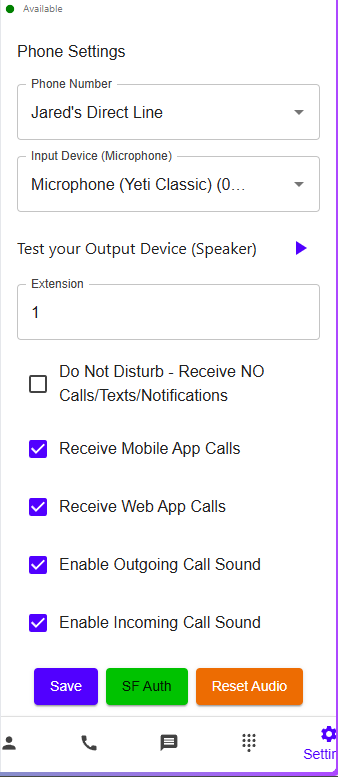
Set the device you receive calls on
- Open the Phone and go to settings
- Set which device to receive calls on, press save
Do Not Disturb Mode
On the settings above, you can see a checkbox for Do Not Disturb. If this is checked and saved, then you will not receive any calls, texts or notifications. You’ll be removed from all the call routing logic, so this is the perfect way to step away for:
- Vacation
- During appointments events or times that you know you won’t be able to answer at all
- Sabbaticals
Set when you are available to receive calls & texts
- Go to the valstorm app
- Go to your profile
- Click Edit
- Scroll down to the bottom
- Modify the following:
- Each day and time
- Your time zone
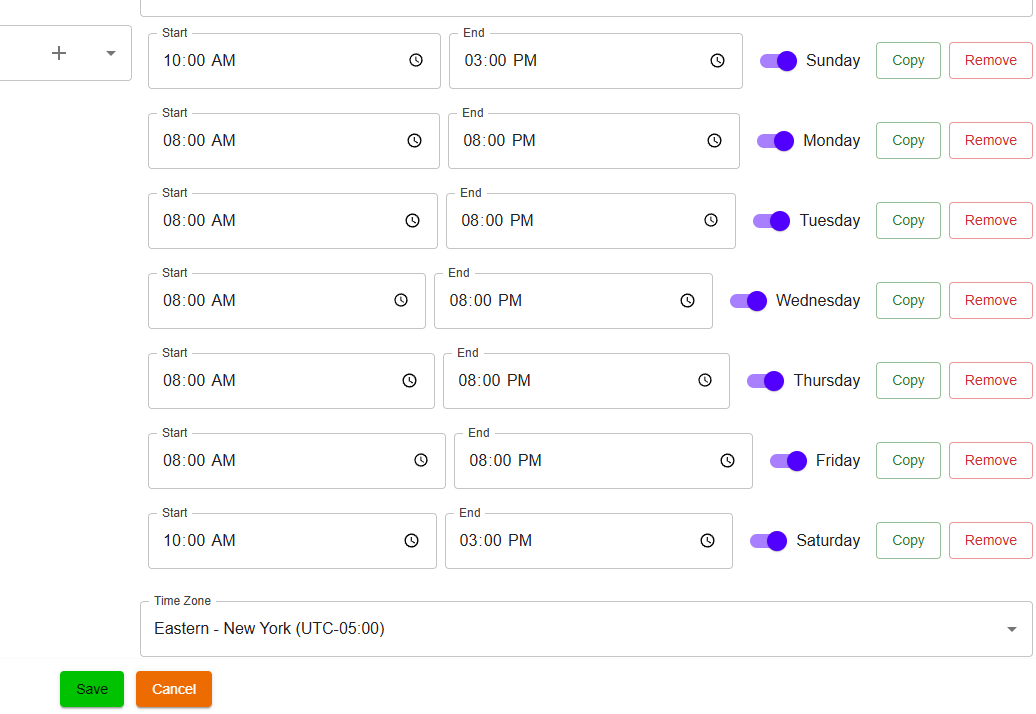
- Click save
Phone Configuration
Configuring Phones
- Go to this link to modify phone numbers
- Ensure every user who should receive calls from the phone is in the circled list. We configure who gets called and when else where